
What Is Coding for Kids? A Complete Parent’s Guide to Helping Your Child Start Coding
Your child may already use technology every day.
They watch videos, play games, use apps, browse websites, and interact with digital devices almost effortlessly.
But what if they could move from simply using technology to understanding and creating it?
That is where coding for kids begins.
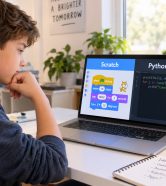
Coding for children is a simplified and engaging way to teach young learners how computers follow instructions and how digital products such as games, apps, websites, robots, and interactive projects are created.
And no, teaching coding to children does not mean placing them in front of a black screen full of complicated commands.
A good introduction to programming should begin with:
- creativity,
- experimentation,
- games,
- problem-solving,
- interactive projects,
- and age-appropriate challenges.
A child may start by making a cartoon character move across the screen.
Then they gradually learn how conditions, loops, events, variables, and logic work.
Later, they may progress to areas such as Python, robotics, game development, artificial intelligence, websites, mobile applications, electronics, and 3D design.
The goal is not necessarily to turn every child into a professional programmer.
The greater value is helping children learn how to think, solve problems, experiment, and turn an idea into something real.
In this guide, you will learn what coding for kids really means, the best age to start, which programming tools are suitable for children, what your child can create, and how to choose the right learning path.
What Does Coding for Kids Mean?
Coding is simply the process of giving a computer a set of instructions so it knows what to do.
Traditional programming languages require users to type commands using specific syntax.
For beginners, especially younger children, this can make learning unnecessarily difficult.
That is why many educational coding tools use a more visual and interactive approach.
For example, a child may see a character inside a game and give it instructions such as:
- Move 10 steps.
- Wait for one second.
- If the character touches the coin, add one point.
- If the player reaches the finish line, display a winning message.
- Repeat this movement five times.
To the child, it may feel like building a game.
But behind the scenes, they are learning real programming concepts.
Sequence
Instructions must be executed in the correct order.
Conditions
If something happens, perform a specific action.
Loops
Repeat an instruction several times.
Variables
Store information such as score, time, speed, or player lives.
Events
Trigger an action when something happens, such as clicking a button or touching an object.
This allows children to understand the logic of programming before worrying about complex syntax.
Why Should Kids Learn Coding?
Parents often ask:
Does my child really need to learn coding?
The answer does not have to be based on future careers alone.
The real value of coding education is often found in the way children learn to think while building projects.
Imagine that your child creates a game, but the character does not move correctly.
They need to ask:
What went wrong?
Where is the problem?
Which instruction should I change?
What happens if I try another solution?
That process is an excellent exercise in analysis, experimentation, and problem-solving.
Coding can support the development of several important skills.
1. Logical Thinking
Programming encourages children to break large problems into smaller steps.
Instead of thinking:
I want to create a game.
They learn to think:
I need a player, movement, a score, obstacles, winning conditions, and losing conditions.
This structured way of thinking can be valuable far beyond programming.
2. Problem-Solving Skills
In coding, mistakes are part of the learning process.
If a project does not work as expected, the child must investigate why.
They test different ideas.
They change something.
They run the project again.
Over time, children begin to understand that a problem is not necessarily a reason to stop.
It is something that can be examined and solved.
3. Creativity
Coding is not only about numbers and commands.
It can be used to create:
- games,
- interactive stories,
- animations,
- mobile apps,
- websites,
- robots,
- 3D models,
- electronics projects,
- and artificial intelligence projects.
Children can use technology as a tool to express their own ideas.
Instead of only consuming digital content, they begin creating it.
4. Patience and Persistence
A project rarely works perfectly on the first attempt.
And that is one of the most valuable parts of learning programming.
The child changes something.
Tests it.
Finds another problem.
Tries again.
Eventually, they reach the result they wanted.
This process can help develop patience and persistence.
5. Computational Thinking
Computational thinking does not mean thinking like a computer.
It means learning how to:
- understand a problem,
- break it into smaller parts,
- identify patterns,
- design a solution,
- test the result,
- and improve it.
These skills can be useful even if your child never chooses programming as a career.
Is Coding Suitable for Every Child?
Most children can learn basic programming concepts if the learning experience matches their age, interests, and ability.
However, not every child should begin in exactly the same way.
A child who loves video games may be excited by game development.
A child who enjoys building things may be more interested in robotics and electronics.
A creative child who enjoys drawing and designing may prefer 3D design.
Another child may become fascinated by:
- mobile apps,
- websites,
- Python,
- artificial intelligence,
- or robotics.
So instead of asking:
Is my child suitable for coding?
A better question is:
Which technology path will make my child excited to learn?
How Do I Know If My Child Is Ready to Learn Coding?
Your child does not need previous programming experience.
They do not need to be a mathematics expert either.
Some signs that your child may enjoy coding include:
- They enjoy solving puzzles.
- They are curious about how games work.
- They like building or assembling things.
- They enjoy creating stories or drawings.
- They ask questions about technology.
- They like experimenting.
- They often ask “why?” and “how?”
- They enjoy creating something and showing it to others.
Even if your child does not show all of these signs, the best way to find out is often through practical experience.
Is your child between 7 and 13 years old and you are not sure which technology path suits them best?
At CIY Club, your child can attend a free trial session where they explore technology, complete a practical activity, and have their level and interests evaluated before choosing the most suitable learning path.
Book a Free Trial Session
What Is the Best Age for Kids to Start Coding?
There is no single perfect age for every child.
The most important thing is to choose tools and activities that match the child’s stage of development.
Younger learners should usually begin with visual and interactive programming rather than being pushed directly into text-based coding.
Ages 7–8
Children can start with:
- logical thinking,
- puzzles,
- visual programming,
- Scratch,
- interactive stories,
- simple games,
- introductory robotics.
At this stage, children should feel that they are building and exploring, not studying a difficult technical subject.
Ages 9–10
Children may be ready for more advanced projects such as:
- advanced Scratch projects,
- game development,
- robotics,
- sensors,
- programming logic,
- level design,
- electronics projects.
Ages 11–13
Depending on the child’s experience and ability, they may begin exploring:
- Python,
- game development,
- web development,
- app development,
- artificial intelligence,
- electronics,
- advanced robotics,
- 3D design,
- and 3D printing.
However, age alone should not determine the child’s level.
One 9-year-old may already be ready for advanced challenges, while another child of the same age may benefit from a slower and more visual introduction.
That is why evaluating the child’s level and interests is more useful than simply grouping students by age.
What Is the Best First Programming Language for Kids?
One of the most common questions parents ask is:
Should my child start with Scratch or Python?
The answer depends on the child’s age and previous experience.
Scratch for Kids
Scratch is one of the most popular environments for introducing programming concepts to children.
Instead of typing every command manually, children use colorful programming blocks that fit together.
This reduces frustration caused by syntax errors and allows the child to focus on the logic behind the project.
With Scratch, children can learn concepts such as:
- conditions,
- loops,
- events,
- variables,
- movement,
- interaction,
- game mechanics.
For many beginners, Scratch can be an excellent starting point.
Python for Kids
Python is a real programming language used in many professional fields.
Children can gradually move toward Python when they have developed a solid understanding of basic programming concepts and are ready to type code.
Python can later be used for:
- games,
- applications,
- automation,
- data projects,
- artificial intelligence,
- and many other programming projects.
However, there is little benefit in forcing a child to learn Python too early if it makes programming feel difficult or frustrating.
The best tool is the one that suits the child’s current level and makes them excited to build the next project.
Is Scratch Just a Game?
No.
Scratch looks colorful and playful because it was designed to make programming accessible to young learners.
However, the concepts children use are real programming concepts.
When a child uses an if block, they are learning conditions.
When they use repeat, they are learning loops.
When they create a variable to store a player’s score, they are learning how variables work.
Scratch is not necessarily the final destination.
It can be an effective bridge between understanding programming logic and moving into more advanced technologies.
What Can Kids Create After Learning Coding?
This is one of the most important questions parents should ask when evaluating any coding program.
Learning programming should not be limited to watching an instructor explain concepts.
Children should build something themselves.
For example, a beginner may create a simple game where the player collects coins.
Then the child adds:
- a scoring system,
- a timer,
- different levels,
- sound effects,
- a winning screen,
- a losing screen.
A simple project can gradually teach several programming concepts at the same time.
As the child progresses, they may create:
- interactive games,
- animations,
- websites,
- mobile apps,
- robots,
- electronics projects,
- 3D models,
- and artificial intelligence projects.
This is where the difference becomes clear between:
a child who uses technology
and
a child who creates with technology.
Coding or Robotics: Which Is Better for My Child?
You do not necessarily have to choose between coding and robotics.
In fact, robotics can be one of the most exciting ways to make programming visible and tangible.
Instead of writing a command and only seeing the result on a computer screen, a child can write an instruction and watch a real robot:
- move,
- stop,
- detect an obstacle,
- follow a line,
- read a sensor,
- activate a light,
- or produce a sound.
If your child enjoys building things and working with physical objects, robotics for kids may be an excellent introduction to programming and engineering.
What About Artificial Intelligence for Kids?
Artificial intelligence is becoming an increasingly important part of the technologies children interact with.
But teaching AI to children should involve more than simply showing them how to ask ChatGPT questions.
Children should gradually learn age-appropriate concepts such as:
- What is artificial intelligence?
- How can AI systems learn from data?
- Why can AI make mistakes?
- How can we verify AI-generated information?
- What information should not be shared with AI tools?
- How can AI help us create rather than replace our own thinking?
As children progress, these concepts can be applied through practical projects that match their age and level.
Does Learning Coding Increase Screen Time?
Parents are right to think carefully about screen time.
But not every hour spent in front of a screen is the same.
There is a significant difference between a child spending one hour passively scrolling through videos and a child spending that same hour:
- solving a problem,
- designing a character,
- writing instructions,
- creating a game,
- testing a project,
- discovering a bug,
- and fixing it.
The goal should not simply be to increase screen time.
The goal is to improve the quality of the time children spend using technology.
Activities such as robotics, electronics, 3D design, and 3D printing can also connect digital learning with hands-on physical projects.
How Can I Start Teaching My Child Coding From Scratch?
Here is a simple step-by-step approach.
Step 1: Start With What Your Child Loves
If your child loves games, do not begin with a lecture about algorithms.
Start with:
Would you like to create your own game?
If they enjoy robots, ask:
Would you like to make this robot move using your own instructions?
A child’s curiosity is often more important than choosing the perfect programming language.
Step 2: Choose a Small First Project
The first project should be simple and achievable.
Completing a small project gives children a sense of achievement and motivates them to try something more challenging.
Step 3: Make Learning Practical
A useful principle is:
Less explanation, more application.
Whenever children learn a new concept, they should use it immediately inside a project.
Step 4: Let Your Child Make Mistakes
Do not solve every problem for them.
Instead, ask questions such as:
- What did you expect to happen?
- What actually happened?
- Where might the problem be?
- What could we change?
- What do you think will happen if we try this?
This turns mistakes into learning opportunities.
Step 5: Build a Clear Learning Path
Avoid constantly switching between different websites, courses, and programming languages.
A structured path may look like:
Logical thinking → Visual programming → Games and projects → Text-based coding → Specialized technology path
A clear progression is usually more valuable than trying many unrelated tools.
How Do I Choose the Right Coding Program for My Child?
Before enrolling your child in a coding course for kids, consider the following questions.
Is the Program Appropriate for My Child’s Age?
A program designed for a 7-year-old should not be identical to one designed for a 13-year-old.
Activities, pace, and level of complexity should change as the child develops.
Is There an Assessment Before the Child Starts?
A proper evaluation helps determine where the child should begin instead of placing every student at the same level.
Does My Child Actually Build Projects?
Ask one simple question:
What will my child create?
If the answer is unclear, that may be a warning sign.
Does the Program Use Project-Based Learning?
Projects allow children to see the result of what they have learned.
They also give each lesson a clear purpose.
Does the Instructor Give the Child Enough Attention?
One child may understand a concept immediately.
Another may need several attempts.
The quality of interaction between the instructor and child can make a major difference in the learning experience.
Is There a Clear Long-Term Learning Path?
Learning one platform should not be the final goal.
Ask:
What happens after Scratch?
When does the child move toward text-based coding?
Can they learn Python later?
Can they explore robotics, games, AI, websites, apps, or electronics?
A clear progression allows children to continue developing instead of repeating similar beginner-level content.
Can My Child Try the Program Before Enrolling?
It can be difficult to evaluate a learning environment from an advertisement or website alone.
A trial session allows you to observe:
- whether your child enjoys the activity,
- whether they interact well with the instructor,
- whether they understand the lesson,
- whether the subject interests them,
- and which level is suitable.
At CIY Club, you do not have to guess which technology path is right for your child.
Children aged 7–13 can attend a free trial session of approximately 20–30 minutes, explore a practical technology activity, and have their level evaluated before choosing the right path.
Book Your Child’s Free Trial Session
Online Coding Classes or In-Person Coding Classes?
Both can work well.
The right option depends on your child.
Online coding may work well if your child:
- can stay focused during online lessons,
- has a quiet environment at home,
- prefers flexible scheduling,
- communicates comfortably through video calls.
In-person coding may be better if your child:
- needs more direct interaction,
- loses focus easily online,
- enjoys working with physical devices,
- is interested in robotics or electronics,
- benefits from hands-on supervision,
- learns better in a dedicated environment.
There is no single option that is best for every child.
If you are based in Riyadh and want to know whether in-person learning suits your child, allowing them to try a real session can make the decision much easier.
7 Mistakes to Avoid When Teaching Kids Coding
1. Starting With a Programming Language That Is Too Difficult
More advanced does not always mean better.
2. Focusing on Memorizing Code
Children should understand why an instruction is used instead of simply memorizing what it looks like.
3. Comparing Your Child With Other Children
Learning speed is not the only measure of success.
4. Turning Every Lesson Into a Lecture
Children learn programming by building and experimenting.
5. Fixing Every Error for Your Child
Finding and correcting mistakes is part of learning to program.
6. Constantly Switching Between Tools
Developing real skills in one learning path can be more valuable than trying five tools without mastering any of them.
7. Forcing the Child Into a Subject They Do Not Enjoy
A child may not enjoy traditional coding but may love robotics.
Another may enjoy game development.
Another may discover technology through 3D design.
The first goal is to discover what sparks their curiosity.
Quick Test: Which Technology Path Might Suit Your Child?
Ask your child these questions.
Do you enjoy creating games more than simply playing them?
They may enjoy Game Development.
Do you enjoy building things and discovering how they move?
They may enjoy Robotics and Electronics.
Do you enjoy drawing, designing, and creating objects?
They may enjoy 3D Design.
Would you like to create an app like the ones on your phone?
They may enjoy App Development.
Are you curious about how ChatGPT or intelligent apps work?
They may enjoy learning about Artificial Intelligence.
Do you enjoy puzzles and understanding how programs work?
Programming and Python may be a strong direction.
These questions are not a final assessment.
They are simply a way to identify areas that may spark your child’s interest.
Practical experimentation is still the best way to know.
How Do I Know If My Child Is Really Learning Coding?
Do not measure progress only by the number of lessons completed.
Look for signs such as:
- Your child can explain their project.
- They can start building from a blank project.
- They understand why they used a specific command.
- They can find some of their own mistakes.
- They modify projects with their own ideas.
- They do more than simply copy the instructor.
- They can demonstrate how the project works.
- Their next project becomes more advanced than the previous one.
The best sign of learning is not necessarily a certificate.
The strongest sign is your child being able to say:
“I made this.”
What Can Kids Learn at CIY Club?
CIY Club helps children explore a broad range of technology skills rather than limiting them to one area.
Learning paths include:
- Coding for Kids
- Robotics for Kids
- Artificial Intelligence
- Game Development
- 3D Design
- 3D Printing
- Electronics
- App Development
- Web Development
The appropriate starting point can be selected based on the child’s:
- age,
- current level,
- interests,
- learning pace,
- and readiness.
CIY Club provides in-person technology education in Riyadh through its branches in:
Qurtubah
and
Al Yasmin
Parents can also let their child experience the program before committing to enrollment.
Ready to Help Your Child Start Coding?
If you have reached this point, you do not need to memorize the names of programming languages or choose your child’s entire technology path today.
The most useful next step is simple.
Let your child try.
Watch what happens.
Do they enjoy it?
Do they ask questions?
Do they keep trying when something does not work?
Do they want to finish the project?
Those signs can tell you much more than a theoretical assessment.
If your child is between 7 and 13 years old and you live in Riyadh, you can book a free trial session at CIY Club.
During the session, your child can:
- experience coding and technology,
- complete a practical activity,
- explore available learning paths,
- and have their level evaluated before you decide.
Don’t just tell your child that coding can be exciting. Let them experience it.
Book a Free Trial Session at CIY Club
Frequently Asked Questions About Coding for Kids
What is coding for kids?
Coding for kids is the process of teaching programming and computational thinking in an age-appropriate way using games, interactive projects, visual programming, and eventually text-based programming languages.
What is the best age for kids to start coding?
Children can begin learning basic programming concepts at a young age when the tools match their developmental level. At CIY Club, programs are designed for children aged 7–13, with the appropriate level selected according to the child’s age, skills, and interests.
Does my child need to be good at mathematics to learn coding?
No. Children do not need to be excellent at mathematics before they begin coding. Curiosity, problem-solving, experimentation, and the ability to follow logical steps are more important at the beginner level.
Is Scratch good for kids?
Yes. Scratch is a strong starting point for many children because it teaches programming concepts visually. Children can learn conditions, loops, events, and variables while building games and interactive projects.
Can kids learn Python?
Yes. Children can move to Python when they are ready to type code and already understand basic programming concepts. The right starting age depends on the child’s experience and ability.
What is the difference between coding and robotics for kids?
Coding teaches children how to give instructions to computers and software. Robotics combines programming with physical devices, electronics, engineering, sensors, and motors so children can see their code control a real machine.
Are online or in-person coding classes better for kids?
Both can be effective. Some children learn well online, while others benefit more from direct interaction, hands-on projects, robotics, and in-person supervision.
How do I choose the right coding class for my child?
Look for a program that is age-appropriate, project-based, practical, provides an initial assessment, gives the child enough instructor attention, and offers a clear learning path beyond the beginner level.
Should my child learn Scratch or Python first?
Scratch is often a good choice for beginners and younger learners because it makes programming visual and interactive. Python can be introduced when the child is ready for text-based coding. The best choice depends on the child’s level, not age alone.
What can children create after learning coding?
Children can begin with simple games and interactive stories, then progress to websites, mobile applications, robots, electronics projects, artificial intelligence projects, and 3D designs depending on their learning path.
Conclusion
Learning coding is not only about preparing children to become programmers.
One of its greatest benefits is teaching children to:
Think → Experiment → Make mistakes → Analyze → Improve → Create
Technology is already part of education, work, entertainment, communication, and everyday life.
Helping children understand how technology works can give them more than technical knowledge.
It can help them become confident creators rather than passive users.
So instead of asking only:
Should my child learn coding?
Consider asking:
How can I make my child’s first coding experience exciting enough that they want to continue learning?
That is where the journey begins.
Ready to discover the right technology path for your child?
Book a free trial session at CIY Club and let your child explore coding, robotics, artificial intelligence, and modern technology through practical learning.